



 Github Stars:
 Last Commit:
  Created:

Overview
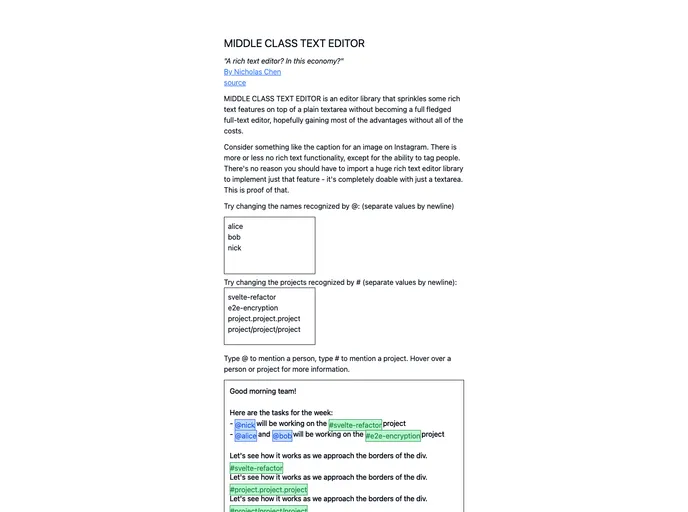
The Middle Class Text Editor offers a unique and innovative approach to text editing by incorporating Slack-style mentions directly within a plain text environment. This tool stands out by utilizing a clever combination of absolute positioning for its three key components: the underlay div, the textarea, and the overlay div. As users type, the editor engages in real-time updates, visually enhancing the keywords to create a more interactive writing experience.
This text editor not only fulfills the standard role of a text input field but goes a step further by rendering keywords distinctively. By utilizing regex matches, it captures the essence of mentions, making it a powerful tool for collaborative and engaging text editing. Whether you’re drafting a document, chatting in a team, or creating a showcase application, this editor provides a well-structured environment for expressing thoughts.
Features
Real-Time Keyword Rendering: Keywords are rendered as users type, allowing for a dynamic interaction that resembles familiar messaging platforms.
Three-Layered Structure: The editor employs an underlay, textarea, and overlay system for a seamless user experience while keeping clickable elements functional.
Absolute Positioning Magic: By cleverly using absolute positioning, the editor ensures that keywords maintain their intended placement and functionality without disrupting text flow.
Ease of Development: With straightforward npm (or pnpm/yarn) installation, developers can quickly set up a project and start working on their library.
Flexible Publishing Options: Customize your package information in package.json, including naming and licensing, before easily publishing to npm.
Preview Production Builds: A simple command allows users to preview the production version of their application, ensuring that everything works smoothly before going live.
Adaptive Showcase: The src/routes directory serves as a preview app, enabling users to showcase their work effectively.




















































